
Ephemeral Room Chat & File Transfers
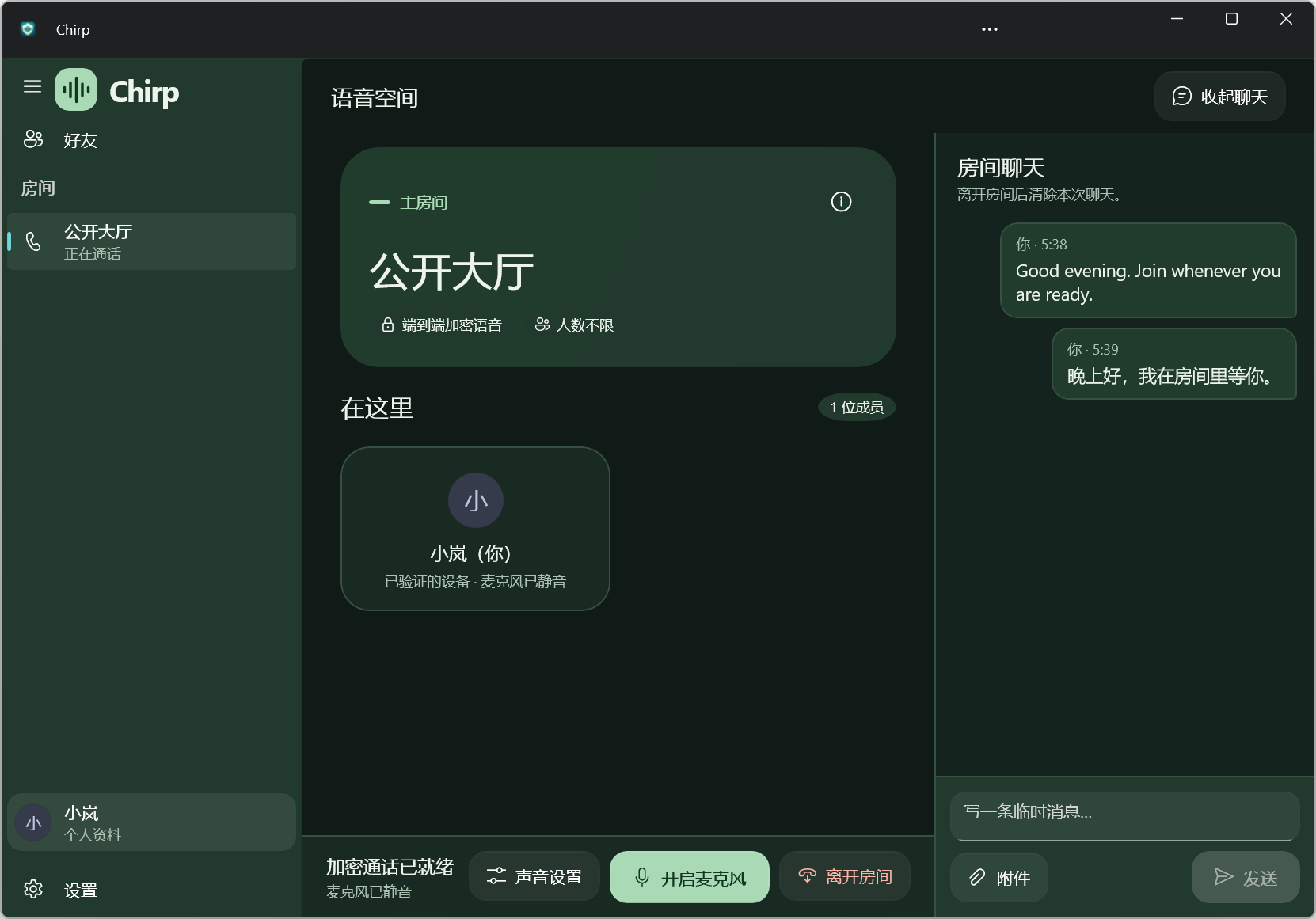
Once everyone in a room completes pairwise device verification, open the chat drawer or side panel to send text messages and files. Text and attachment transfers run independently from voice mute state—you can message and share files even while muted.
Ephemeral In-Room Chat
By design, Chirp servers never store room chat history. Every text message and attachment descriptor travels over an end-to-end encrypted WebRTC data channel solely between currently online participants in that room:
- Length cap: Up to 4,096 UTF-8 bytes per message (remember CJK characters typically take 3 bytes and emoji 4 bytes); whitespace-only messages are rejected.
- In-memory session buffer: Each client keeps up to the 1,000 most recent messages/attachment items during the active room stay.
- Immediate wipe on exit: As soon as you leave the room, switch rooms, get removed by an admin, switch login sessions, or quit the app, chat history and unsent drafts vanish instantly. Rejoining or arriving late never surfaces older messages.
- Pause during security changes: Whenever someone enters, leaves, or brings an unverified device, sending locks automatically until the room completes re-keying.
Sending & Auto-Receiving Attachments
Chirp attachments use split end-to-end encryption: the sender generates a fresh random file key locally, encrypts chunks on disk, and uploads ciphertext—the server relays opaque encrypted blobs and never sees real filenames, thumbnails, or file keys. File keys travel exclusively inside the encrypted room data channel to peers already present in that room.
- Ensure recipients are online & ready: Before picking a file, make sure intended recipients are already inside the room and the room is secure:
- Standard files: Up to 100 MiB plaintext (including 0-byte files).
- Previewable images: JPEG, PNG, HEIC, WebP, or GIF up to 20 MiB and 60 megapixels total. GIFs animate on export; inside chat bubbles only the first frame previews.
- Encrypt & upload: Your client encrypts locally and uploads 1 MiB network blocks. Interrupted uploads can be resumed within 15 minutes of creation.
- Auto-download & verify: Recipients who were online when sending began queue downloads automatically, verify the full ciphertext SHA-256 and per-record AEAD tags, and unlock preview/export.
- Missed deliveries: Friends who join after you hit Send, or stay disconnected past the 6-second SSE grace window, are marked
skippedand cannot fetch that file later—re-send once they are back and ready.
Voice-first automatic throttling
By default, transfers run up to 8 MiB/s per direction. If live call quality drops to poor or network jitter reaches 40 ms, Chirp throttles transfers to 512 KiB/s so large files never starve voice clarity.
Always Export Files Before Leaving a Room
Seeing a thumbnail or "Downloaded" badge only means the encrypted copy sits in this room session's temporary cache. Uploaded ciphertext stays on the server for at most a 15-minute delivery window and is purged immediately once all recipients confirm receipt or leave.
To keep a photo or document permanently, click Export on its chat card before leaving or switching rooms, choose your Downloads folder or Photo Library, and verify it saved cleanly.
| Scenario | What happens to the attachment |
|---|---|
| Sender leaves mid-upload | Incomplete uploads cancel immediately; already-completed uploads continue delivering to remaining online recipients. |
| Recipient clears attachment cache | Temporary local cache and file keys wipe immediately with no server fallback; newer transfers still work. |
| Recipient leaves or switches rooms | The previous room's chat history and encrypted attachment cache are destroyed; the new room starts clean. |
| Recipient already exported | Exporting decrypts straight to your chosen OS location outside Chirp's sandbox—leaving or clearing cache leaves exported files untouched. |